Free browser extension
FillScope for TradingView: your fills and P&L on the chart
Open any chart on TradingView and every trade you made in that symbol is drawn on it: where you got in, where you got out, and what it paid. The numbers come from your own broker records in FillScope, not from manual notes.
Chrome, Edge, Brave and Arc. Version 1.3.0 · 21 KB · Chrome Web Store listing coming soon.
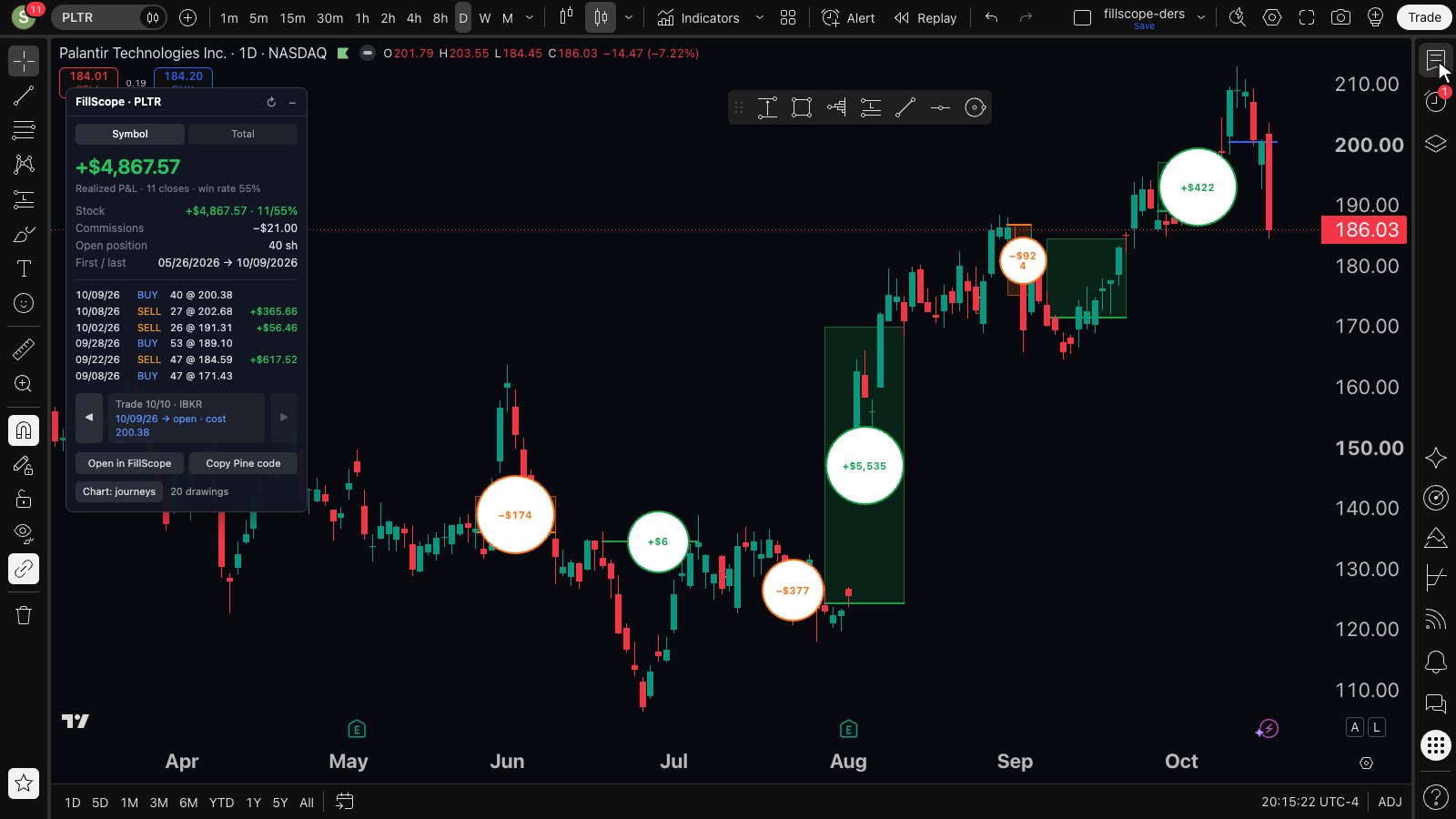
Demo account with sample trades. Your own chart shows your own fills.
What you see on the chart
Trade journeys
Each position from first fill until it is flat again: the cost line, a box from entry to exit and the profit in a disc. Green for wins, orange for losses, blue while still open.
Step through trades
◀ ▶ in the panel jump the chart to your previous or next trade in that symbol, with the dates and the holding time.
Symbol panel
Realized P&L for the symbol, closes and win rate, commissions, open position and your latest fills.
Total tab
Today, this week, this month and this year, plus your top winners and losers. Click one and the chart switches to it.
Price
Free
The extension with any FillScope account. The free plan imports your last 90 days of trades, so the chart shows those.
FillScope Pro
Full trade history on every chart, plus time-of-day edge, risk and R-multiple, AI trade review and CSV export. Compare plans.
Install in two minutes
- Sign in to FillScope (free) and import your trades: Interactive Brokers through a Flex Query, or a Midas / Akbank export.
- Download fillscope-tradingview-1.3.0.zip and unzip it.
- Open chrome://extensions (Edge: edge://extensions) and switch on Developer mode in the top right corner.
- Click Load unpacked and pick the unzipped
fillscope-tradingviewfolder. - Stay signed in at fillscope.com, sign in to TradingView and open any chart. The FillScope panel appears near the top left of the chart; drag it anywhere.
Updates: download the new zip, replace the folder and press the reload icon on the extension card.
What it can and cannot access
- It reads the symbol of the TradingView chart you have open and asks fillscope.com for your realized trades in that symbol. Nothing else leaves your browser.
- It is read-only: it cannot place orders and sends nothing to TradingView or to your broker.
- Permissions:
storage(panel position and preferences), access to fillscope.com (your data) and to tradingview.com pages (to draw). - Drawings are made through TradingView's own chart tools and are removed when you switch them off in the panel.
Questions
Is it really free?
Yes. It works with every FillScope account. Pro ($0.99 a month) adds your full history; the free plan covers the last 90 days.
Which brokers?
Whatever FillScope imports: Interactive Brokers through Flex reports, plus Midas and Akbank exports.
Do I need a paid TradingView plan?
No. TradingView only lets signed-in users place drawings, so you need to be signed in; a free TradingView account is enough.
Safari or Firefox?
Not yet. The extension runs in Chromium browsers: Chrome, Edge, Brave and Arc.
Learning to read charts first?
The Chart Workbook series covers chart reading, price action and smart money concepts: $1.99 each or $3.99 for all three.